Global Sequence
LicenseIncluded in Int4 Shield LiteDetails
| Feature or limit | Int4 Shield Lite |
|---|---|
| Test data dynamization | Included |
Anything a license model does not include can be added through a custom license. The license installed for you is shown in the app under Profile → License. All features by license
Overview
A global sequence is a named, reusable number range that hands out incrementing, formatted identifiers — the equivalent of an SAP number range object. Use one whenever a test needs a fresh, unique value on every run: an order number, a document ID, a correlation key, and so on. Because the sequence is shared, many test cases can draw from the same range, and each value is guaranteed to be handed out only once.
Global sequences exist to solve a specific replay problem. A test case is usually built from a real, recorded interaction, and replaying it as-is would send the same document number over and over — duplicating or colliding with documents that already exist in the tested system. By drawing a fresh value from a sequence on each run, a replay produces a brand-new document every time, so it neither clashes with real data nor with earlier test runs. The unique value also gives the test something to find the new document by afterwards, which is how a later validation step locates exactly the document this run created. A common practice is to size or prefix a range so its values never overlap the numbers the backend assigns on its own, keeping test documents cleanly separable from genuine ones.
Sequences are one piece of the platform's broader approach to test data: instead of hand-editing payloads, a test author manages data purely through configuration — capturing values out of one message, generating fresh ones, and writing them back into others. A sequence is the generator side of that picture: it is where the fresh, guaranteed-unique numbers come from. This page is only where you define and maintain the ranges; the actual injection into a message happens inside an automation object that asks the sequence for its next value.
Each sequence remembers the last value it gave out. The next request returns that value plus one, formatted according to a display template. For example, a sequence with the template ORDER-{{NUMBER}}-XYZ and a current value of 41 hands out ORDER-00000042-XYZ next (the digits are zero-padded to a configurable width). You can also give a sequence optional lower and upper bounds so it never produces a value outside an agreed range.
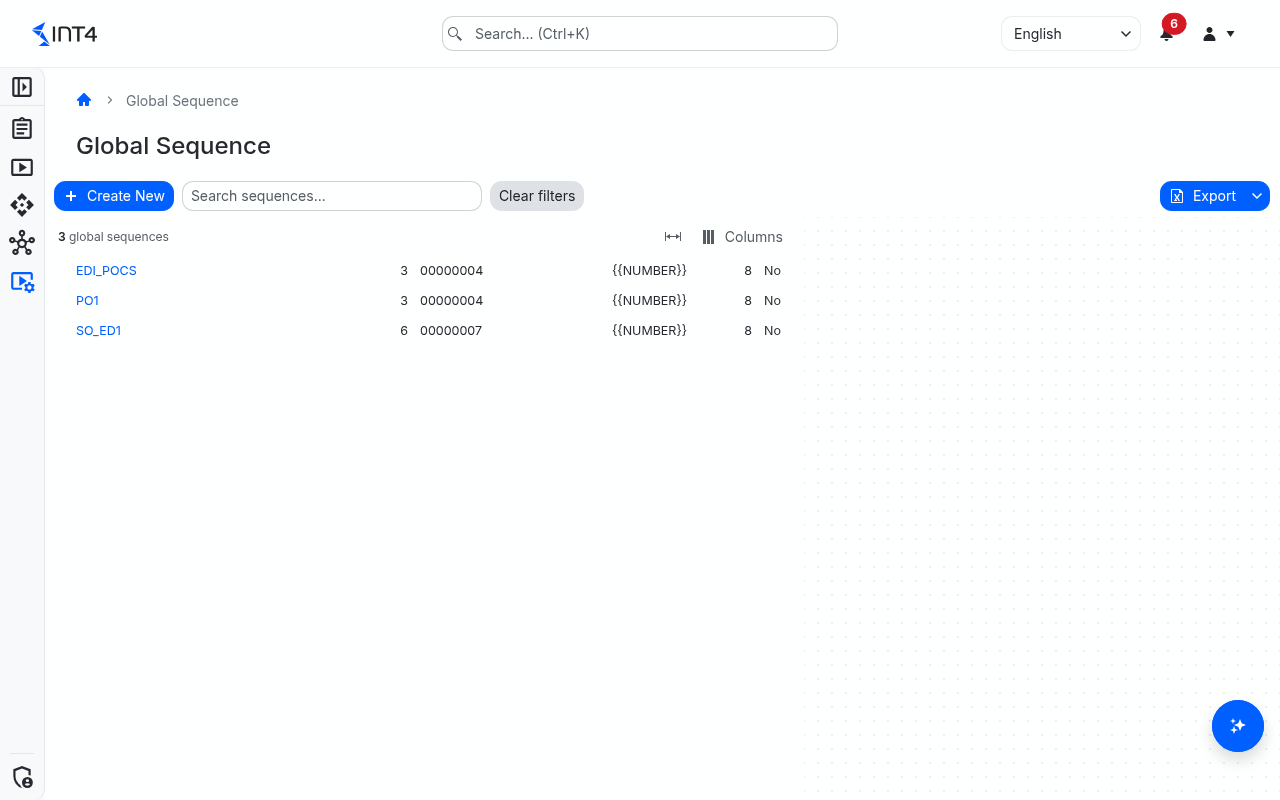
This page lists every global sequence on the platform. From here you can search the catalogue, open a sequence to view or edit its settings, create a new one, or delete one you no longer need. Sequences are consumed inside automation objects: a step in an automation object's data-handling configuration asks the named sequence for its next value and writes that value into the message being sent. You do not run a sequence from this page — this page is only where you define and maintain the ranges themselves.
The list shows each sequence's current value next to a Next value preview — the exact identifier the sequence would hand out next — so you can check the format and the counter at a glance without using up a number. Use the search box to find sequences by name or description, and Export to Excel or Export to PDF to share the list.
Tasks
How to create a sequence
- Select Create New in the toolbar. The button is disabled if you do not have permission to create sequences.
- Under Identification, enter the Name — the identifier automation objects use to reference the sequence (for example
ORDER_NO) — and optionally a Description and a project scope. - Under Numbering, set the starting point in Current value. This is the last value handed out, so the first value the sequence produces is this number plus one.
- Adjust Format template and Pad length to get the identifier you need, for example
PO-{{NUMBER}}with a pad length of 6 forPO-000001. - Optionally set Low value and High value to bound the range, and select Increment per test run if every test case in one run should share the same value.
- Select Save. You return to the list and see Global sequence created successfully.
How to change a sequence or move its counter
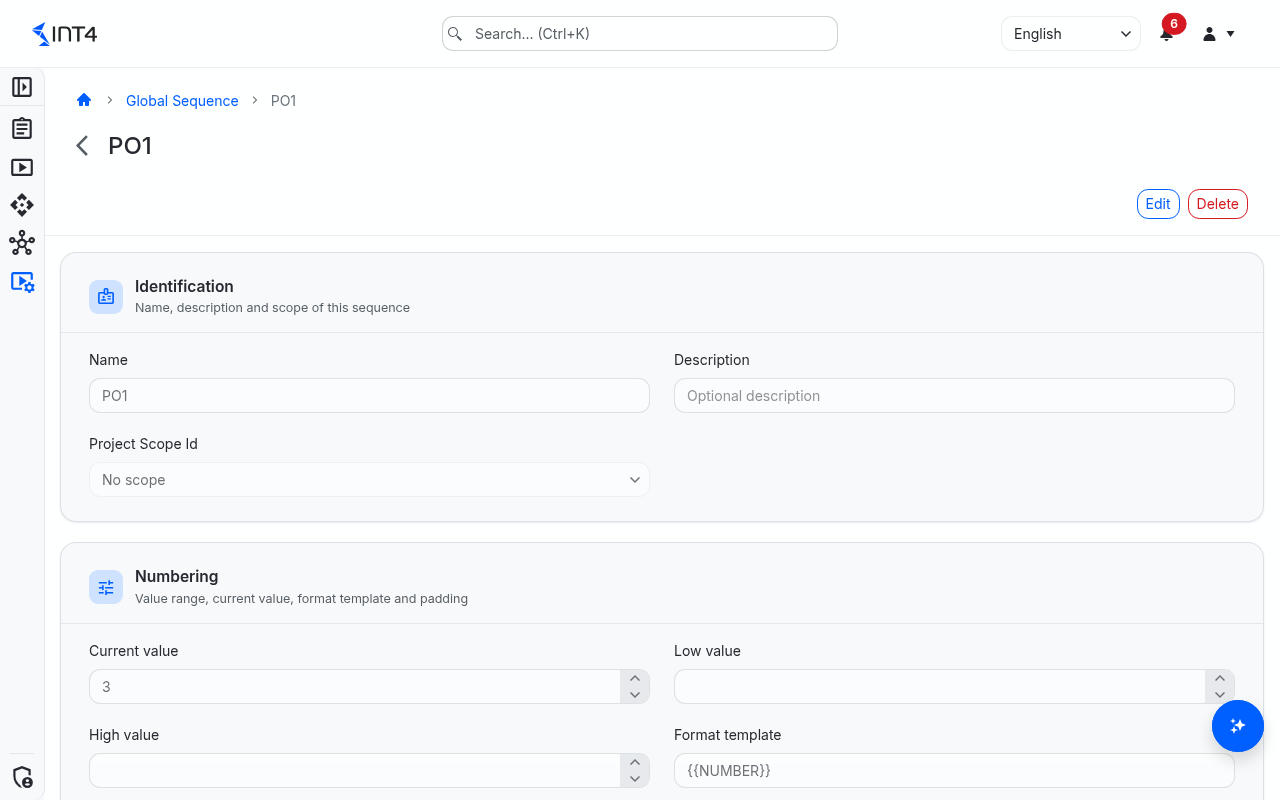
- Open the sequence from the list and select Edit. The bar above the form shows Editing mode.
- Change the settings you need. To skip ahead — for example after real documents have used part of the range — raise Current value.
- Select Save Changes, or Cancel to discard your changes. On success you see Global sequence saved successfully.
How to delete a sequence
- Open the sequence and select Delete.
- Confirm in the Delete Global Sequence dialog. You return to the list and see Global sequence deleted successfully.
If an automation object still uses the sequence, the delete is refused and an error message names up to five of the automation objects that reference it. Change those automation objects first, then delete again.
Field reference
| Field | Description |
|---|---|
| Name | Identifier of the sequence, shown as Sequence in the list. 1–64 characters: letters, digits, ., - and _, starting with a letter or digit. Unique regardless of upper and lower case. Automation objects reference the sequence by this name. |
| Description | Optional note, up to 255 characters, describing what the sequence is for. Included in the search. |
| Project Scope Id | Optional project scope that controls who can open, change and delete the sequence. No scope leaves it unscoped. |
| Current value | The last value handed out. The next value is this number plus one. It advances automatically as the sequence is used. |
| Low value | Optional lower bound. The current value may not be below it. |
| High value | Optional upper bound. The sequence stops handing out values once the next one would exceed it. |
| Format template | Template for the generated identifier, shown as Value format in the list. Must contain {{NUMBER}}, where the counter is inserted, and be 10–128 characters long, for example ORDER-{{NUMBER}}-XYZ. |
| Pad length | Minimum number of digits for the counter, zero-padded on the left. With 8, the value 42 appears as 00000042; with 0 it appears as 42. Default 8. |
| Increment per test run | When selected, the sequence advances once per test run instead of once per use: the first step in a run that asks for a value draws it, and every later step in the same run receives that same value. Shown as Incr. per Test Run in the list. |
| Next value preview | List only. The formatted value the sequence would hand out next. Showing it does not use up a number. |
Tips & edge cases
- Each value is handed out only once. When two test runs ask for a value at the same moment, the platform serialises the requests so they never receive the same number.
- Keep test numbers clear of real ones. The reason a test uses a sequence at all is to avoid replaying the original document number and colliding with real data. When the backend does not itself reject a reused number, give the generated identifier a recognisable prefix or suffix in the format template, or confine the range to a slice of the number space the backend never assigns on its own. That keeps the documents a test creates clearly separable from genuine business documents and lets later validation steps find exactly the document this run produced.
- Lowering the current value reissues numbers. If you move Current value back, the sequence hands out numbers it has already given out. Only lower it when you know those numbers are free again in the tested system.
- A bounded sequence can run out. Once the next value would pass High value, the test step that asks for a value fails. The sequence never wraps around. Leave enough headroom or leave the upper bound empty.
- Bounds must be consistent. The current value must lie between the lower and upper bound (each is checked only when set), otherwise the sequence cannot be saved.
- "Increment per test run" shares one value across a whole run. Every test case in the run that draws from the sequence gets the identical value, which is what you want when a run's documents must carry one common reference number. Outside a test run — for example when a value is generated while a test case is saved, or by a Messenger virtualization flow — the sequence advances on every use, whatever the option says.
- Previews do not use up numbers. When the platform previews an automation object's data handling without running a test, a sequence step shows the placeholder
PREVIEW-SEQUENCEinstead of drawing a value. - Reference the name exactly. Names are unique regardless of case, but an automation object must spell the name with the same upper and lower case to find the sequence; otherwise its step fails with a "not found" error.
- The delete check covers automation objects only. It looks for the sequence's name in automation-object settings, so it can occasionally be over-cautious about a name that merely appears as text. Messenger virtualization flows are not checked: a sequence they use can be deleted, after which their step fails.
- Counter changes are not in the history. Structural changes such as name, bounds and template are tracked; changes of the current value are not, so you cannot see which numbers were consumed by which run.
- You may see sequences you cannot open. The list shows every sequence. Opening, changing or deleting one requires the permission in that sequence's project scope; for a sequence without a scope, the permission must be granted without a project scope.
- Migrated sequences. Number ranges migrated from an earlier Int4 Suite installation appear here as ordinary sequences. Ranges that belonged to a single automation object are named
LOC_<range>_<n>with the description "Migrated from AO …". Repeating the migration never lowers a current value and leaves your other changes to the sequence untouched. - Export covers the loaded rows. The list loads more rows as you scroll; Export to Excel and Export to PDF export the rows loaded so far.
Related features
- Automation objects — where a sequence is consumed: a step in the automation object's data handling asks the named sequence for its next value and writes it into the message.
Prerequisites & permissions
About permissions. What you can see and do is decided by the roles assigned to your user. Each role bundles permission groups, and each permission group allows activities — Read, Write, Delete, Execute and, for schedules, Change owner — on a kind of record (for example Test Case, Automation Object, System Under Test). A role grants its groups per project scope, so you may be allowed to change records in one project but only view, or not see, those of another.
If a button is disabled, a page says you don't have access, or a list comes back empty, missing permissions are the most likely cause — or, for whole product areas, the installed licence. You can review your own access under Profile → My access; an administrator can change your roles under IAM → Users.
- Global Sequence: Read — open the list and view a sequence.
- Global Sequence: Write — enables Create New and Edit.
- Global Sequence: Delete — enables Delete.
Where a sequence has a project scope, these permissions are checked against that scope. Creating, changing and deleting sequences also requires the test data dynamization licence feature; without it you can still view sequences, but saving or deleting is rejected with a licence error.